How to Request High-Quality Digital Transfers from the National Archives (NARA)
Every video on The Archive Project is derived from a film reel or tape master held at the National Archives.
If you require a higher-quality film scan than the one on our website, there is a process available to obtain high-quality digital transfers in uncompressed and preservation-grade formats at resolutions up to 2K and 4K.

The transfer process may seem daunting at first, but it’s much easier than it looks. After one successful run-through, we’re confident you’ll feel comfortable doing it again, and we hope you’ll use this new skill to make the most of this vast, affordable, and historically important archive.
If you’d rather have us handle the entire process, we can do that. Just email us at contact@thearchiveproject.com with links to the videos you’d like to transfer. We’ll walk you through what to expect and send you a quote. Through our partnership with a local lab, we’re able to offer this service at about the same price you’d pay to do it yourself.
If you’re going it alone, we hope you find the guide below helpful—please reach out with any questions.
Before You Start
Although an excellent value compared to other high quality archival footage vendors, NARA’s digital film transfer process can be expensive and involves quite a bit of coordination and paperwork.
We generally recommend pursuing this option only if you have the appropriate production budget, are producing broadcast-quality content, or have a project aimed at distribution.
That said, it still costs you nothing to do the initial inquiry on the films you need cleared, or to get a quote from one of the approved vendors. So, if you’re in the early stages of a project, this process is still helpful in gaming out a prospective footage budget.
There are strict quota limits on the number of reels you can request. Currently, NARA allows each individual or production group 24 requests per week. Each IARL has 12 entry lines, which means you can submit two forms per week. There are no exceptions to this rule.
If you end up feeling this process might be too complicated to pursue yourself, there are many seasoned NARA researchers available for hire to help you navigate a successful film transfer. You can find a list of these individuals and their contact info here.
Process Summary
The first step in the process is to fill out an IARL form and email it to NARA. An archivist will review your document and verify the film assets are on hand. Once they approve your film choices, you will need to select one of the approved film labs to do the actual digital transfers.
Only a handful of vendors are certified to provide this service, and they are all located in the Washington, DC area:
We’ll be using Henninger as the example for this guide because you can simply upload your approved NARA IARL form via their NARA Transfers page and they’ll follow up with a quote and next steps.
Once you approve the quote, the lab will handle the rest of the process which includes having the film reels delivered from NARA to the lab, the actual digitizing of the footage, and the upload and delivery of the digital files (generally delivered via FTP).
What You’ll Need
- Time and a budget.
- A list of the film reels you want digitized.
- Patience — turnaround can take anywhere from 1-6 weeks, although in our experience, the timing varies greatly depending on what films you are requesting.
Step-by-Step: Ordering Digital Transfers from NARA
Step 1: Identifying the Films You Want
You’ll need complete item-level information for each reel you want digitized. This includes:
- Local ID (e.g., 111-LC-41033)
- Title or subject of the reel
- Reel number, (if applicable)
Local ID
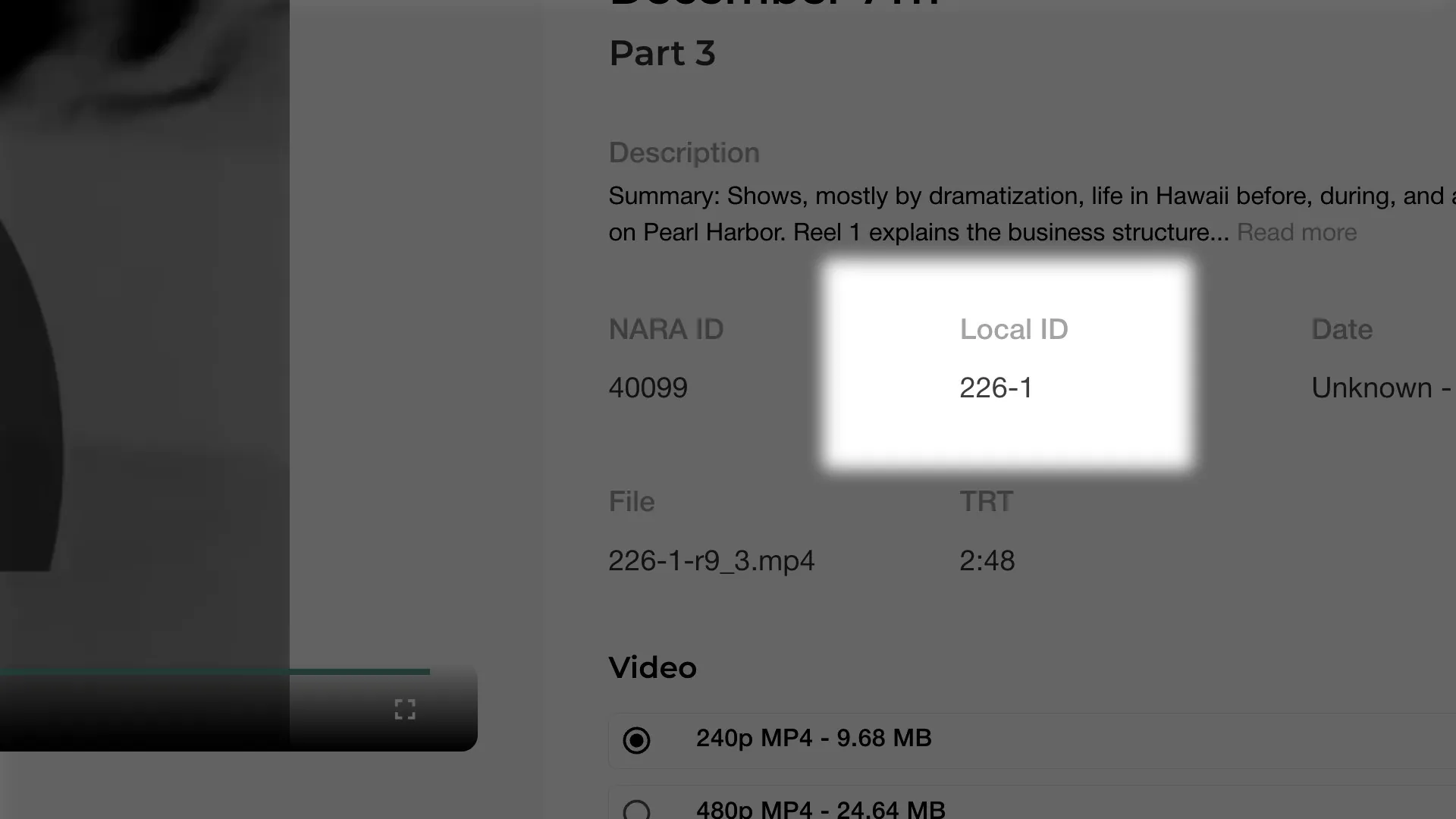
You can find the “Local ID” of any video on The Archive Project just below the “Description” of a video. You’ll also see that every video has a “NARA ID”. You will only need the Local ID when preparing your IARL. The “NARA ID” is an additional identifier that you can use to confirm an asset in case there is an issue with Local ID, which does happen on occasion.
Titles
You can use the titles from the “Title” section. If a video has “Untitled” in this section, we recommend you submit it with no title information on your IARL.
Reels
Finding the correct reel number of an asset can be tricky. Many times, this information isn’t included in the digital log or the entire asset exists on one reel but that isn’t made clear . You can find the reel number of a video asset on The Archive Project in the “File” section. For example in the filename (226-1-r9_3.mp4) r9 refers to reel 9.
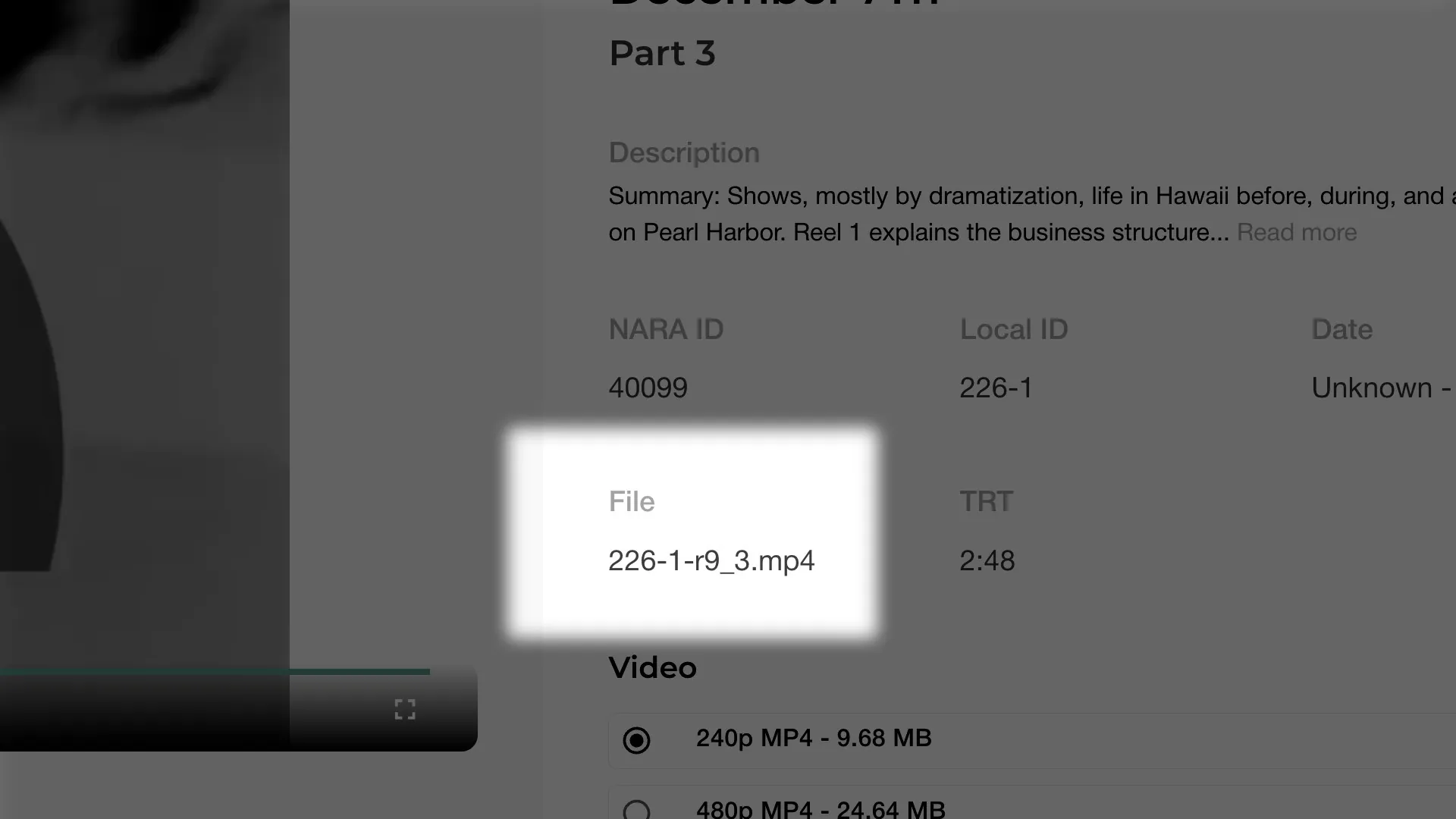
If you do not see something like “-r1” or an “-R3” in a filename, then that asset is not listed down to the reel level. In that case, you can still submit the Local ID as part of your IARL. If there are multiple reels, a NARA Archival Technician will most likely reach out to you letting you know the reel numbers.
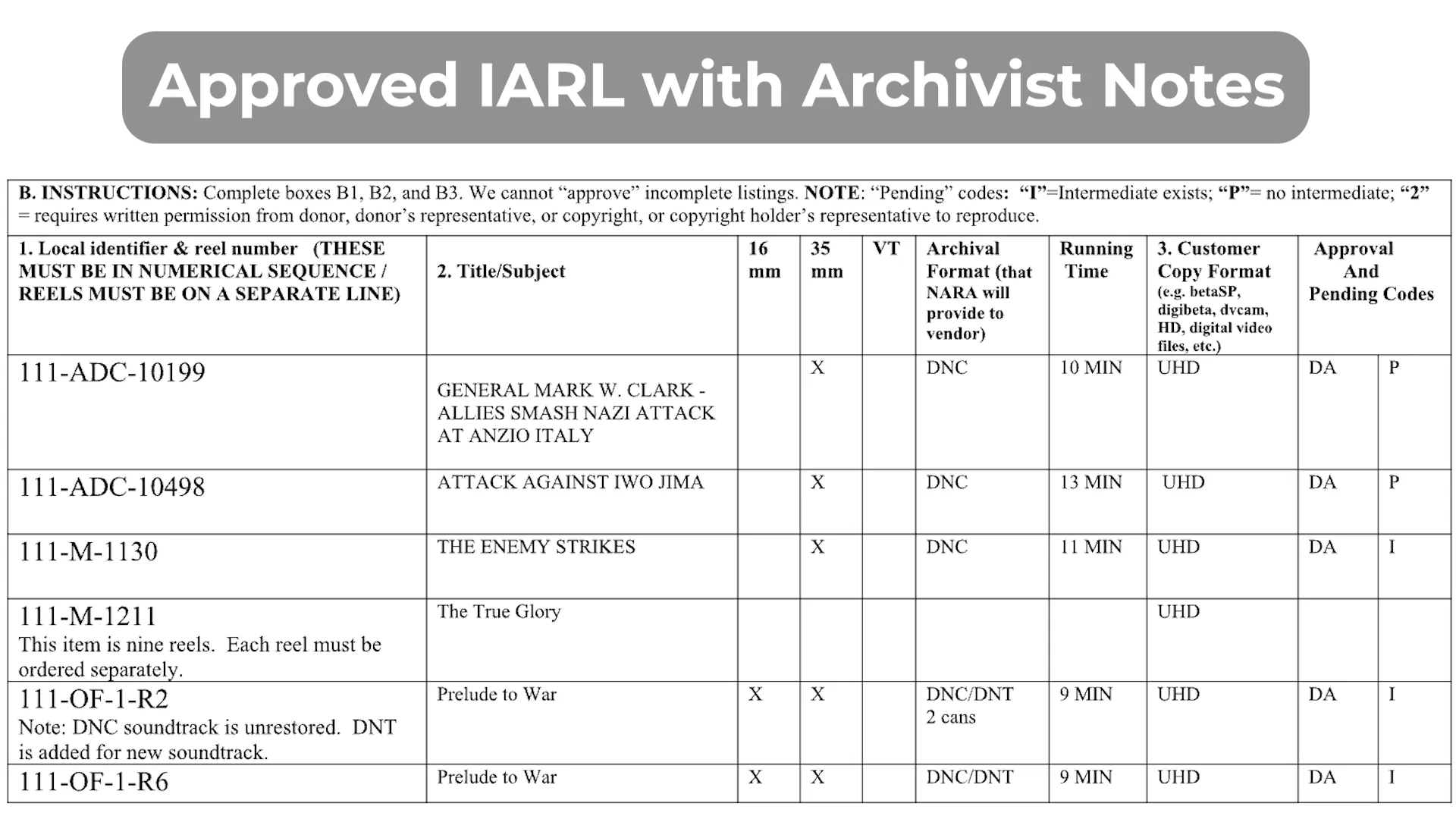
Step 2: Fill Out the Item Approval Request Form
You can download the official IARL here. This is a Microsoft Word file. NARA does not accept PDFs or alternate formats.
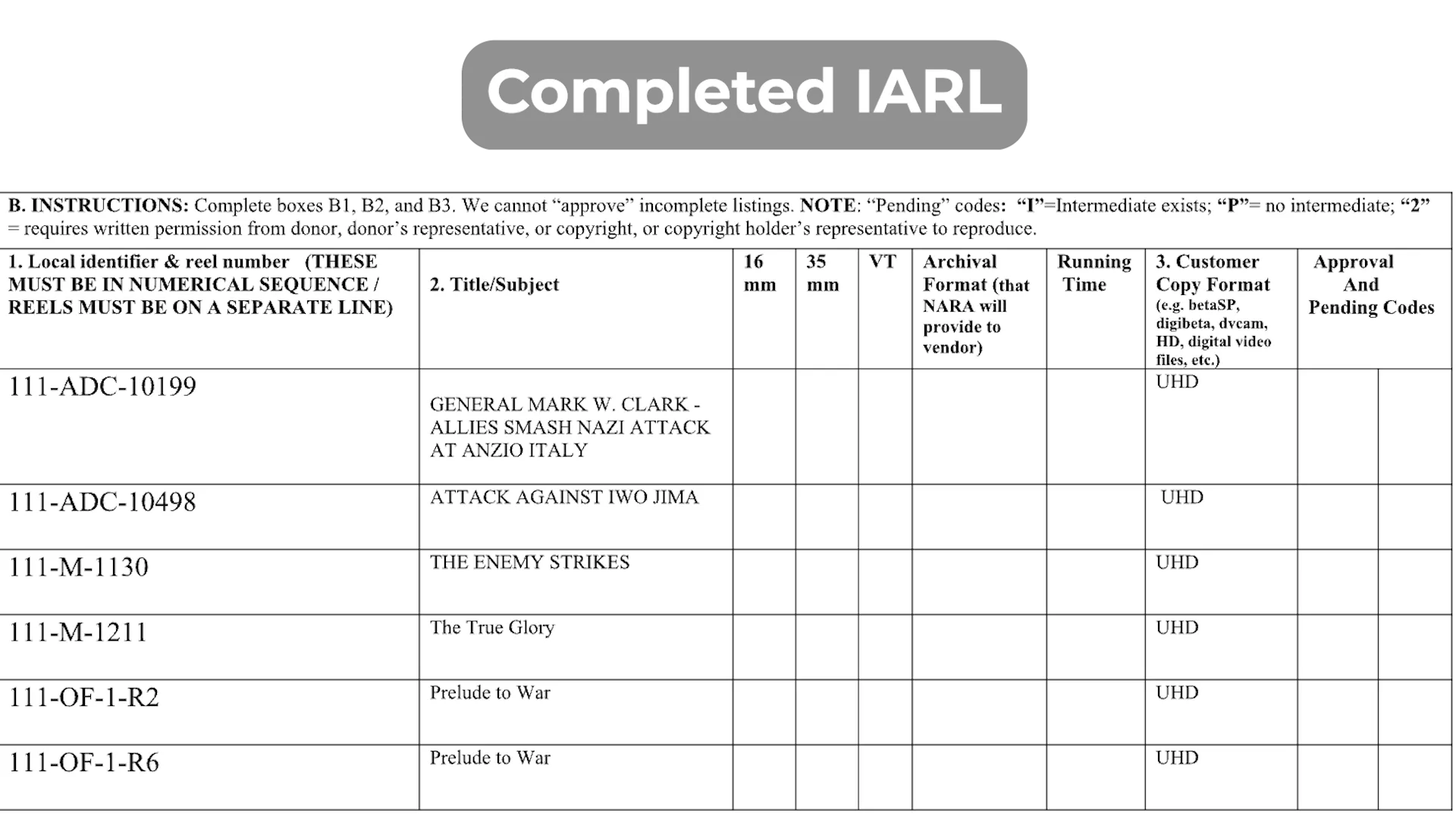
Feel free to refer to our sample completed form for guidance.
Important:
- All entries must be in strict numerical and alphabetical order
- Each reel must be listed on its own line.
- If a form is incomplete or disorganized, it will be returned to you without approval and instructions on how to correct it.
You will need to complete:
- Section A: Your name, contact info, and organization
- Section B1: Local Identifier and reel number
- Section B2: Title or subject
- Section B3: Desired output format (e.g., ProRes 422HQ, DPX, etc.)
Once you’ve completed the form, send it to: mopix@nara.gov along with a brief message such as the below:
Hello,
Please find my IARL attached.
Thanks,
(your name)
You should receive an automated confirmation email shortly after letting you know your request has been received.
Step 3: Wait for Approval from NARA
NARA staff will review your submission. If approved:
- Your form will be returned with an Order Number and Approval Date.
- You’ll have six months to complete your order.
- The "Pending Codes" column will tell you the reproduction status:
- I = Intermediate copy already exists. An Intermediate copy is the fastest and easiest format to obtain a transfer.
- P = No intermediate exists. In this case, only the Preservation copy exists and you will need fund the creation of an Intermediate copy. Longer wait times.
- P/I = Both an Intermediate and Preservation copy are available. Be careful to order one or the other from the vendor and not both.
- 2 = Reproduction requires special permissions or rights clearance. The chances are slim to none that anything you find on The Archive Project will illicit this code. In the case you do receive this code, you’ll need to decide if you want to reach out to right’s holder for use and transfer permission.
Step 4: Choose a NARA-Approved Vendor
Once you’ve received approval, you will need to choose a vendor to complete the reproduction. You are responsible for arranging payment, delivery, and any format-specific requests.
Your Vendor Options are the following:
Below is an example of the full process using Henninger Media Services.
First visit Henninger’s NARA IARL upload page , upload your document and submit it with a short message.
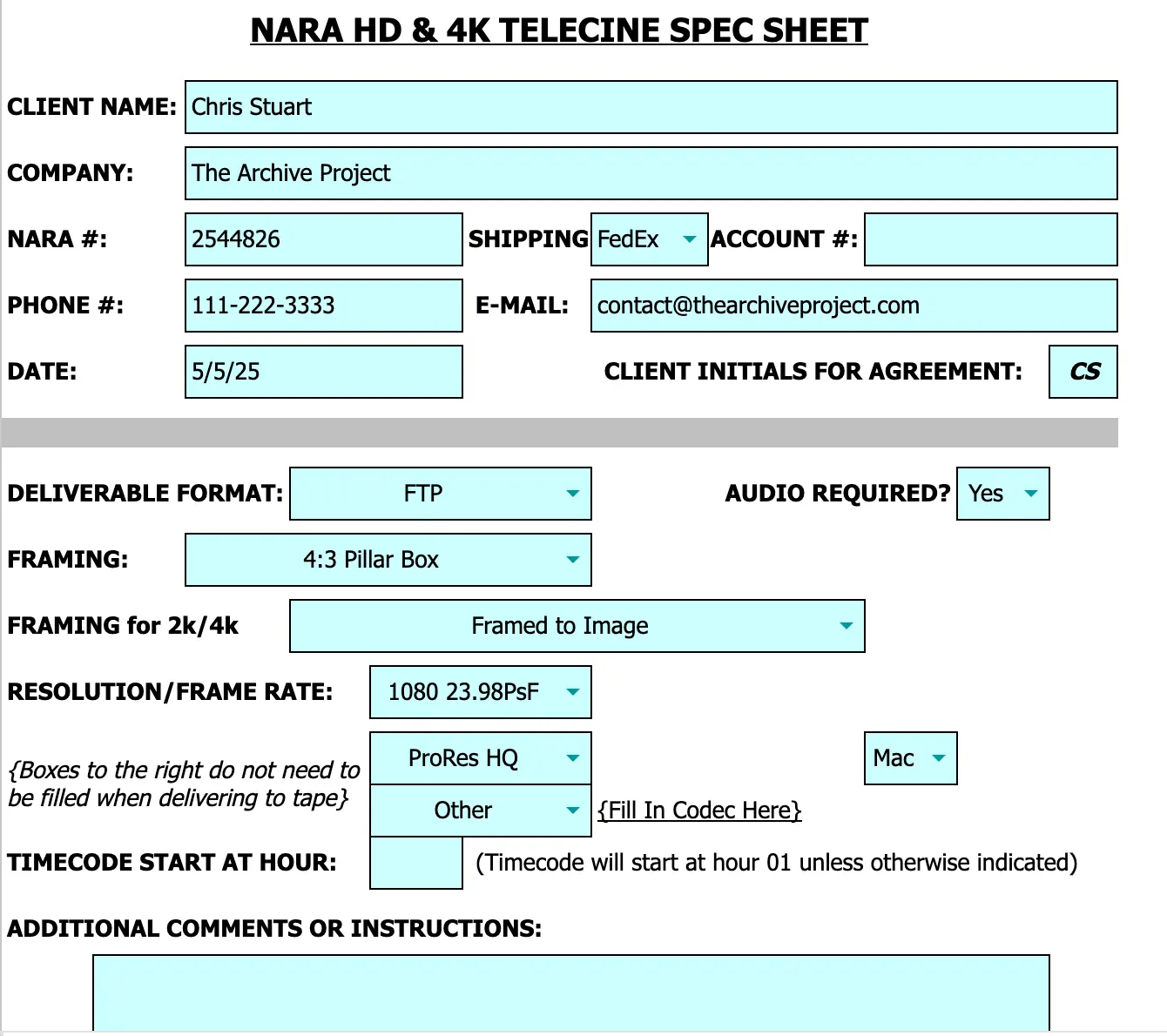
Henninger will reach back out to you with a full quote, a CC authorization form and a tech spec sheet.
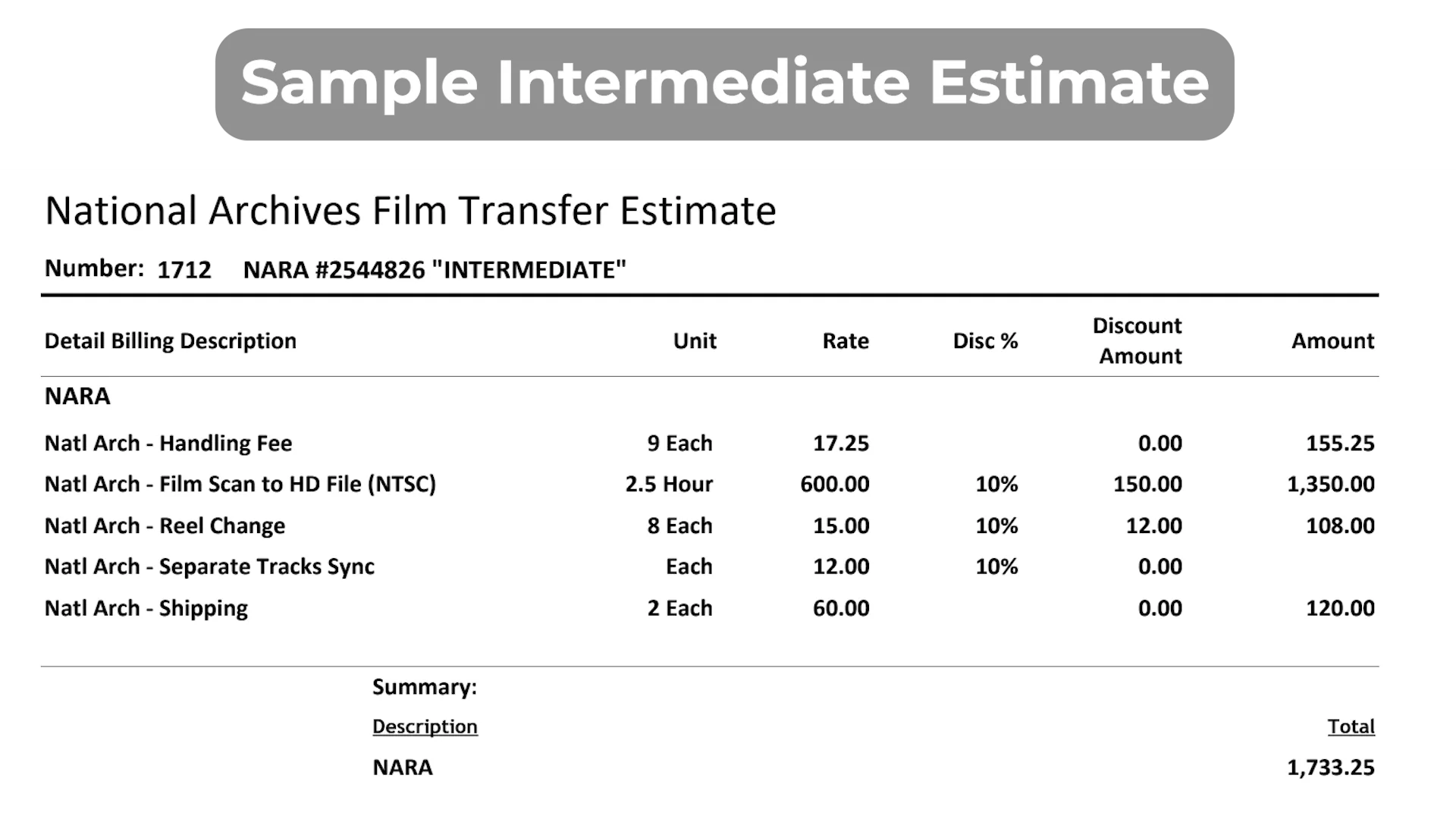
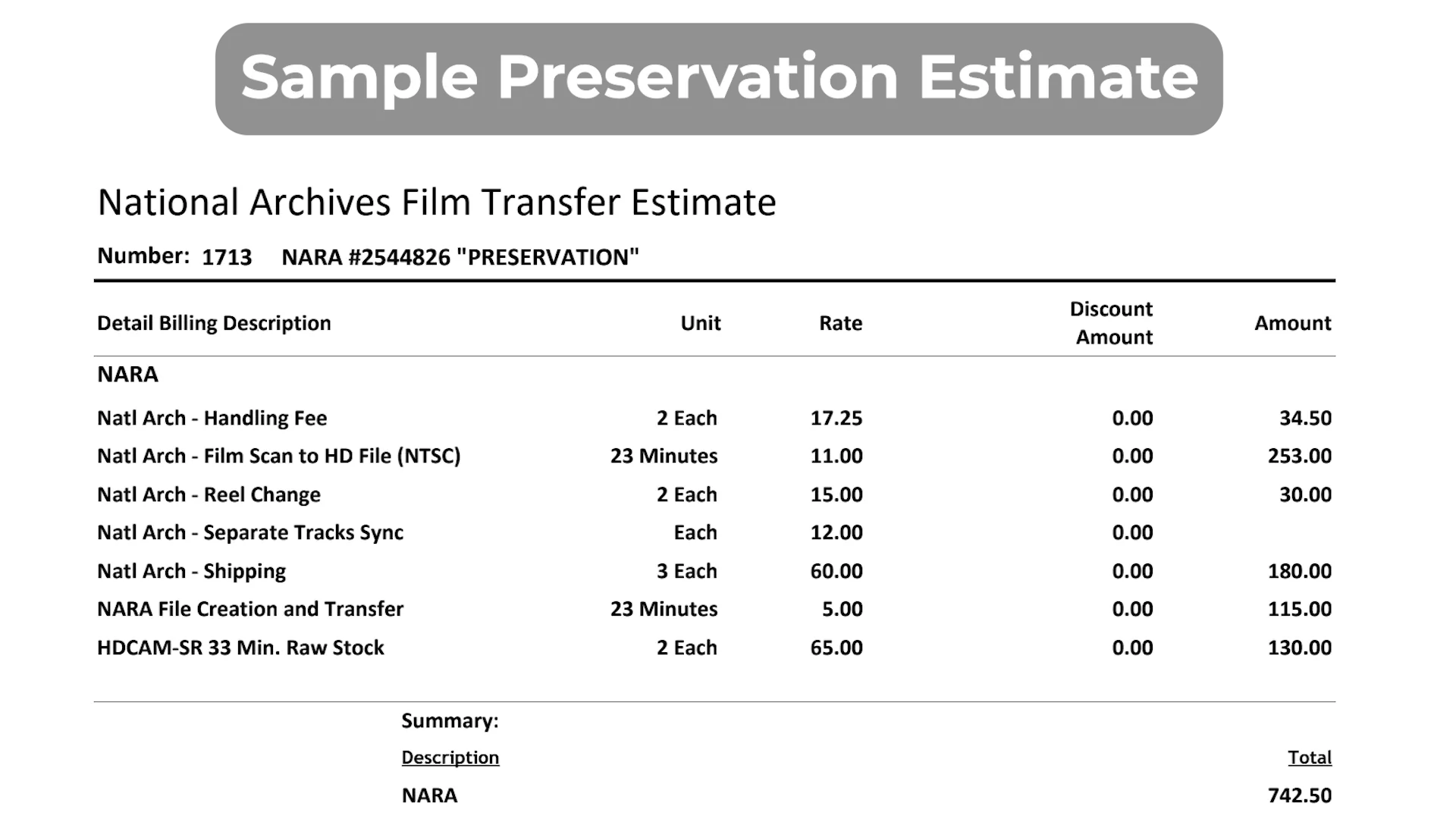
- We’ve included a sample Tech Spec sheet for a ProRes delivery. It’s most likely in your interest to request ProRes for any editing or production related project. DPX is generally for high-fidelity archival masters but is not as user friendly.
Once you confirm the quote and send back the CC authorization form and Tech Spec sheet, the lab you choose will get started on your order. Remember, this could take anywhere from 1-6 weeks so please be patient with the turnaround time.
Step 5: Receive and Review Your Files
- Once your vendor has completed the order, they’ll deliver the digital files according to your instructions.
- Please review all files for accuracy, completeness, and any technical issues. If there’s an error caused during duplication, you have 30 days to request a correction or re-transfer.
- Note: NARA will not accept returns for imperfections inherent in the source film
- Quality is subject to the condition of the original elements.
Tips for a Smooth Process
- Double-check spelling and numerical order on your form.
- Keep a copy of all correspondence and approval documents
- Allow for a turnaround of at least 1 to 6 weeks (sometimes longer)
- Don’t be afraid to reach back out to NARA if you haven’t heard back in a while.